DIGITAL
SOVEREIGNTY
LAB

Practical Workshops · Stockholm

linux · immich · pi-hole · ollama · meshtastic

SCROLL

What you'll build

5 sessions.
5 tools.
All yours.

Each session ends with something installed and running on your own machine. No cloud accounts required. No subscriptions. You keep everything.

SESSION 01
Install Linux on your computer
Ditch Windows or macOS. Your machine runs what you choose, not what Microsoft or Apple decides.
  • Pick a distribution: Ubuntu, Fedora, or something lighter; we compare them
  • Boot from USB and try Linux before touching your existing install
  • Install it, alongside Windows or replacing it, your call
  • Set up your day-to-day: browser, email, code editor, design tools... it's all there
You leave with:
Linux installed and running on your own machine.
Ubuntu · Fedora · bash · apt/dnf
SESSION 02
Self-host your photos with Immich
Stop uploading to Google Photos. Your pictures stay on your hardware, not Google's, not Apple's.
  • Deploy Immich on your own server. Running and accessible by the end of the session
  • Set up automatic sync from your phone over your own network
  • Access it remotely via Tailscale. No port forwarding, no public server
  • Hardware options: old laptop, Raspberry Pi, or a cheap VPS
You leave with:
Immich running. Photos syncing from your phone. No third party involved.
Docker · Immich · Tailscale · Caddy
SESSION 03
Run Pi-hole and Home Assistant at home
Block every ad on your network. Automate your home without an Amazon or Google account.
  • Raspberry Pi: first boot, connect over SSH, install what you need
  • Pi-hole: blocks ads and trackers for every device connected to your WiFi
  • Home Assistant: lights, sensors, climate; controlled locally, no cloud login
  • Once you can run a Pi, you can run anything on it
You leave with:
Pi-hole blocking ads across your whole network. Home Assistant controlling at least one device.
Raspberry Pi · Pi-hole · Home Assistant
SESSION 04
Run AI models on your own laptop
ChatGPT logs everything you type. Ollama runs on your machine and sends nothing anywhere.
  • How LLMs work. One plain explanation, no jargon
  • Ollama: install and run Gemma 4 with a single command
  • LM Studio: a point-and-click interface if you prefer not to use the terminal
  • Practical uses: writing help, document Q&A, coding, summarising. All offline
You leave with:
Ollama running with Gemma 4. A working local AI, no internet required.
Ollama · Gemma 4 · LM Studio
SESSION 05
Communicate when the internet goes down
Bluetooth mesh, LoRa radio, and peer-to-peer sync. Tools that work with no infrastructure at all.
  • BitChat: send messages over a Bluetooth mesh. no SIM, no WiFi, no server
  • Meshtastic + LoRa radio: kilometre-range communication with no cell signal
  • Syncthing: sync files between your own devices, no server in the middle
  • Build your offline kit: What to prepare before you actually need it
You leave with:
BitChat installed and tested between devices. Your personal offline checklist done.
BitChat · Meshtastic · LoRa · Syncthing

What's at stake

Your data.
Your call.

Your photos — Google Photos, iCloud, Meta
Every upload is scanned. Used for AI training, content matching, and ad targeting. Accounts get suspended by automated systems with no human review and no appeal.
Your email and messages — Gmail, WhatsApp, iMessage
Gmail scans your email to build an ad profile. WhatsApp hands metadata to Meta. Telegram is the exception. Most messaging is not private by default.
Your browsing — Chrome, Edge, most apps
Your browser and apps log what you read, search, and buy. That data is sold to data brokers and kept indefinitely. Switching to Firefox + uBlock Origin takes ten minutes.
Your software — Adobe, Microsoft 365, Spotify
Stop paying and you lose access, including to files you created. Open source alternatives exist for almost all of them and don't require a subscription.
Your internet connection
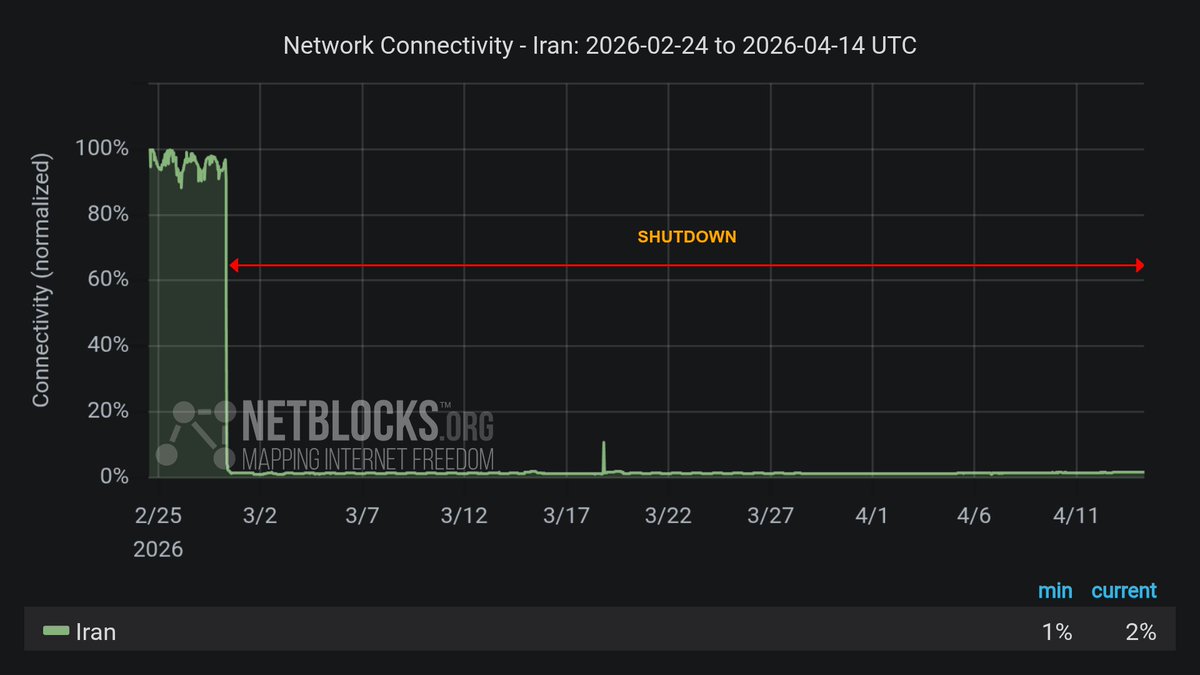
Your ISP can throttle specific services, log your traffic, and hand it over on request. Governments can order a full shutdown. Iran has been offline for 40+ days. It can happen anywhere.

The real threat

It can happen.

2026 · Iran — ongoing
80 million people cut off. Right now.
Iran's internet has been shut down for 40+ days and counting. Families can't reach each other. No cloud. No AI tools. Just gone.
AI content moderation — ongoing
Accounts locked and deleted by algorithmic mistakes.
Image processing and AI moderation errors have permanently deleted years of photos, emails, and documents, with no appeal. The machine made a call, and there is no one to call back.
Cloud is just someone else's computer... And they can turn off that computer anytime.

Iran internet shutdown April 2026 Iran internet shutdown
April 2026
NetBlocks BGP traffic graph NetBlocks traffic graph
BGP withdrawal documented

Who's behind this

About me.

Arash

Arash
Stockholm

I'm Arash. Stockholm-based software engineer, 10+ years. I grew up in Iran and have lived through real internet shutdowns. That experience is the foundation of this curriculum.

I've been building with open source since Ubuntu 5.10. I run open source productivity tools and host a podcast on diaspora experience.

Get in touch

Interested?
Contact me.

If you'd want to attend, reach out. That's what turns a proposal into a workshop.

WEBSITEarashTaher.com EMAILarashTaher at outlook.com
digital resilience · Stockholm → open the terminal version